


Aosu
3.5724.00 Reviews
App Specs
- Version
- 5.3.11
- Updated On
- License
- Free
- Downloads
- 1,000,000+
- Developer
- AosuLife
- Categories
- Communication
- Platform
- Android
Screenshots

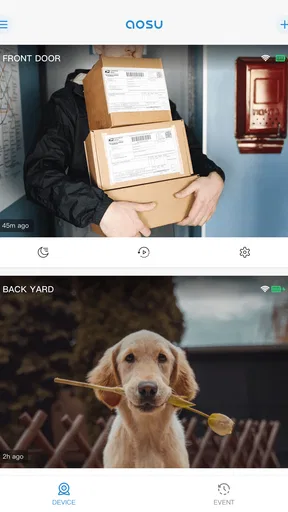
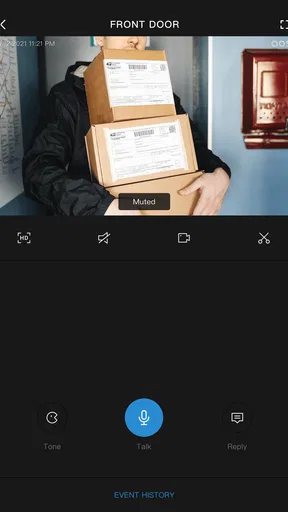

 Analysis by AppCompare
I’d judge Aosu by one practical question: do you already use Aosu smart cameras, or are you choosing a general-purpose communication app? That distinction matters more than a polished-looking interface. This is a free communication app from AosuLife, and its purpose is tied to keeping in touch with the company’s camera system. If that is part of your home setup, it may earn a place on your phone; if you want messaging for friends, work, or community groups, it is the wrong kind of app to start with.
Start with the camera you want to manage
Before installing, I’d check whether the camera you own or plan to buy belongs to the Aosu ecosystem. The app is most relevant when it has a compatible device to connect to; without one, there is little reason to expect it to replace a regular chat app or become useful on its own. That makes this a more focused choice than broad communication services, which are built around conversations between people rather than a connection between a phone and home cameras.
That focus can be a genuine advantage. Keeping camera-related communication in the companion app avoids treating a device-management task like another social feed. But it also means your decision depends on the hardware as much as the software. If you are comparing camera brands, consider the companion app as part of the purchase: you will likely return to it when you need to check or manage the system, so its fit with your devices and habits matters.
A useful role in an ordinary day
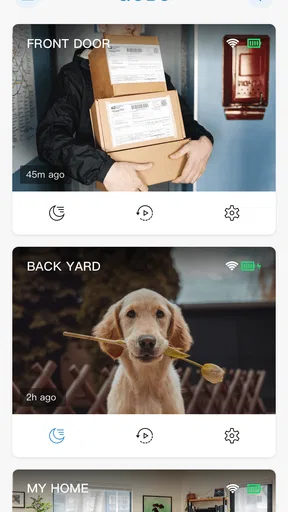
Picture leaving home in a hurry and later wanting to check in on the place you left behind. A camera companion app gives you a single place to turn to for that home-monitoring routine, rather than making you search through general messaging apps or unrelated smart-home tools. I find that kind of direct route more appealing when the task is simple and specific: open the relevant app, deal with the camera, and get back to the day.
It is also worth thinking through who else in the household may need access. If several people share responsibility for checking the home, agree on who will use the app and how it fits into everyone’s routine before relying on it. A companion app can be convenient for the person who set everything up, but the experience is only practical for a household if the other users can understand and use the same process. I would test that with the people who need it, rather than assuming the app will automatically make a shared setup effortless.
For someone who is away from home at regular times, the appeal is easy to understand: the phone becomes the natural place to check in, without needing a separate computer or a manual routine. Still, I would treat camera access as one part of a wider home-security plan, not as a reason to stop using common-sense precautions. The app is a tool for working with compatible cameras, not a substitute for deciding what you want monitored and who should be able to access it.
What the rating and version tell me
Aosu has an average rating of 3.3 from around 2,400 ratings, alongside about 639 written reviews. I read that as a reason to approach it with measured expectations, not as proof that it will work badly for every owner. Companion apps can feel excellent when the devices fit a user’s needs and frustrating when setup or everyday access does not match what that person expected. I would pay attention to recent user feedback about the specific camera and phone combination I intend to use, rather than treating a single average as a complete verdict.
Worth Reading Before You Choose

EA SPORTS FC Mobile 26 Is a Bigger Football Game, but It Takes Time

Flipboard Shows What News Apps Must Do Beyond the Feed

Switching to Android Auto Means Rethinking Your Driving Routine

Google Calendar Makes a Crowded Week Easier to Manage

Ludo King Makes the Most of the Minutes Between Plans

Baby Panda World Brings Quick Play to Modern Phones, but Its Game Library Feels Busy
The app has passed one million installs and is marked for everyone. It was released on August 2, 2021, and version 5.1.51 is the current version. Those details show that it is an established app rather than a brand-new experiment, but they do not by themselves tell me how well a particular camera setup will suit an individual home. I’d still make the practical decision around compatibility and whether the app supports the routine I actually want.
It is listed for Android 8.0 and later. If you are installing it on an older phone, check the operating system version first; if you are using a newer device, remember that compatibility alone does not guarantee the best experience with every camera. For an app that sits between a phone and home hardware, the phone and the device both need to be part of the decision.
Where a dedicated camera app can win
Compared with general messaging apps, Aosu has a narrower job. You do not install it to talk with anyone who happens to have an account on a popular chat service; you install it because the Aosu camera ecosystem is relevant to your home. That difference is useful when you want a focused place for camera-related tasks, and it is a poor fit if your real need is group chat, work messaging, or keeping up with friends.
Compared with using a manufacturer’s website or another smart-home hub, a phone companion app can be the more direct everyday option if your camera is designed to work with it. A separate platform may be better for someone who already manages many kinds of connected devices in one place, but that convenience depends on the devices and services involved. I would not choose a broader system merely because it sounds more flexible; I would choose the route that lets the people in the home complete their actual camera routine with the least confusion.
There is a trade-off in choosing a product-specific app. You may get a more straightforward path for the company’s own devices, but you are also tying an important household routine to that device family. If you expect to mix camera brands or want one shared control point across a varied smart-home setup, compare those needs before committing. Aosu is most compelling when you want to work within its own camera ecosystem, not when you are trying to make every brand behave as one.
Small habits that make the setup easier
I would begin by installing the app and getting the camera connection working while I am at home and have time to troubleshoot, rather than waiting until I need to check something urgently. That gives me a chance to learn where the relevant controls are and to confirm that the device is associated with the right household routine. The point is not to turn setup into a project; it is to avoid making the first real check-in the first time I try to use the app.
Another useful habit is to decide what a successful check-in looks like before relying on the system. Is the main goal simply to open the app and view a camera, or will other household members need to use the same setup too? Being clear about the job helps you notice whether the app is a good fit instead of judging it by unrelated features you do not need. It also makes it easier to spot when a different camera platform, rather than a different communication app, would solve the real problem.
I would keep the phone’s app and camera setup in mind when changing devices, too. A new phone, a change of household roles, or a move can alter who needs access and how the camera is used. Treating those changes as a reason to review the setup is more dependable than assuming a once-working arrangement will automatically suit every new situation.
When I would choose something else
If you do not own an Aosu camera and have no plan to use one, I would skip the app. Its purpose is not to provide a general social or messaging service, and downloading it without compatible hardware is unlikely to meet that expectation. If your priority is talking to people, a standard communication app is the more sensible choice; if your priority is managing several kinds of smart devices, compare platforms that are meant to bring those devices together.
I would also look elsewhere if you need a system that fits an existing mix of camera brands or if your household depends on one particular shared workflow. The right choice is not necessarily the app with the most impressive description; it is the one that works with the equipment you have and is understandable to the people who need it. For a camera purchase, I’d check the full device-and-app combination before deciding, rather than buying hardware first and hoping the companion experience suits me afterward.
Finally, anyone who expects a polished, dependable experience without first checking the camera connection and their own setup should be cautious. Home monitoring is a practical task, so I would test the routine in ordinary conditions and make sure it works for the people who will actually use it. A favorable first impression of an interface cannot answer that question on its own.
Hey there! So, I recently got the chance to dive into the world of Aosu, and let me tell you, it’s been quite an adventure. If you’re like me and love exploring new apps, you’re in for a treat with this one. Let’s break down what makes Aosu stand out from the rest and why you might want to give it a shot.
What’s the Buzz About?
First things first, you might be wondering, "What exactly is Aosu?" Well, it’s an app that’s getting quite a bit of attention lately, and for good reason. It’s designed to bring a fresh spin to how we interact with content on our phones, combining features you might not expect to find all in one place.
User Interface That’s Easy on the Eyes
Let’s talk about the UI. The moment you open the app, you’re greeted with a slick, modern design. It’s intuitive, clean, and just feels good to navigate. I’ve used a fair share of apps that make you feel like you need a manual just to get started, but not this one. Simplicity is the name of the game here, and I’m all for it.
The colors are vibrant without being overwhelming, and everything is where you’d expect it to be. Whether you’re a tech guru or just someone who loves using their phone, you’ll feel right at home.
Features That Pack a Punch
Now, onto the juicy part—what can Aosu actually do? Well, it’s packed with features that aim to enhance your daily routine. One of the coolest things I found was the app’s ability to seamlessly integrate with other platforms. It’s like having a digital Swiss Army knife in your pocket.
From customizable widgets to in-app tools that boost productivity, there’s a lot to explore. I particularly enjoyed the ability to personalize settings to fit my needs. It feels like the app is made just for me, and who doesn’t love that?
Performance that Won’t Let You Down
Performance-wise, it’s pretty solid. I didn’t notice any lag or crashes, which is a huge plus. We’ve all been there—using an app that just can’t keep up with our pace—but that’s not the case here. Whether I was diving into heavy tasks or just browsing, the app handled everything smoothly.
Community and Support
Another aspect worth mentioning is the community around Aosu. There’s a vibrant user base that’s actively engaged. Plus, the support team is responsive and ready to help, which is always reassuring. If you ever run into issues or just want to chat about features, you’ll find plenty of folks ready to join the conversation.
There are forums and help sections built right into the app, making it easy to find answers or share your own experiences. It’s nice to know that you’re not alone when navigating new tech.
Why You Should Check It Out
So, should you download Aosu? In my opinion, absolutely. Whether you’re a casual user or someone who loves to deep-dive into new tech, there’s something here for everyone. It’s not just about what the app can do, but how it does it—effortlessly and with style.
If you’re curious and ready for a new app experience, give it a whirl. You might just find that it becomes one of your go-to apps. Plus, with regular updates and a community that’s buzzing with energy, it’s only going to get better from here.
So there you have it, folks! That’s my take on Aosu. I hope you found this review helpful and maybe even a bit inspiring. If you decide to give it a try, let me know what you think. Happy exploring!
Pros
- Intuitive user interface for easy navigation.
- High-quality video streaming with minimal lag.
- Wide range of content across various genres.
- Offline download feature for on-the-go access.
- Regular updates with new features and improvements.
Cons
- Some content may require additional purchases.
- Occasional ads can interrupt the viewing experience.
- Limited parental controls for younger users.
- Requires a stable internet connection for best performance.
- Not all content is available in every region.
FAQs for Aosu
What is Aosu, and what features does it offer?
Aosu is a versatile app designed to enhance productivity and organization. It offers features such as task management, calendar integration, note-taking with multimedia support, and real-time collaboration. The app aims to streamline your workflow by providing intuitive tools for both personal and professional use. Its cross-platform capabilities allow seamless access across devices.
Is Aosu available for both Android and iOS devices?
Yes, Aosu is available for download on both Android and iOS platforms. The app is optimized for performance on smartphones and tablets, ensuring a consistent user experience regardless of device. You can find it on the Google Play Store for Android users and the Apple App Store for iOS users.
Does Aosu offer any free features, or is it a paid app?
Aosu offers a free version with basic functionalities, allowing users to explore its core features without cost. For those seeking advanced tools and enhanced capabilities, Aosu provides a premium subscription option. This includes additional features like advanced task tracking, priority support, and cloud storage integration.
How does Aosu ensure user data privacy and security?
Aosu prioritizes user privacy and data security by implementing robust encryption protocols and secure data storage solutions. The app complies with international standards for data protection and provides users with control over their data settings. Regular updates and audits further ensure that Aosu maintains a secure environment for all users.
Can Aosu be used offline, or does it require an internet connection?
Aosu offers offline functionality for most of its core features, allowing users to access and edit tasks, notes, and schedules without an internet connection. Changes made offline are automatically synced once the device reconnects to the internet, ensuring continuity and accessibility of data across all platforms.


